Excel转JSON
Excel 转 JSON 工具
这是一个用于将 Excel 文件转换为 JSON 格式的 Cocos Creator 扩展工具。支持多种数据类型和复杂的嵌套结构。
Excel 转 JSON 工具
这是一个用于将 Excel 文件转换为 JSON 格式的 Cocos Creator 扩展工具。支持多种数据类型和复杂的嵌套结构。
用过很多excel转json的工具,但是策划说都不太好用,所以按照策划的要求自己实现了一个。 可能有更强的工具,但是适合自己的才是最好的。
项目信息
- 商店地址: Cocos Store - Excel转JSON
- 支持版本: Cocos Creator 3.6+
功能特点
- 支持将 Excel 文件转换为 JSON 格式
- 支持多个工作表的转换
- 支持单文件和文件夹批量转换
- 支持二进制格式输出
- 支持多种数据类型:
- 基本类型:int、float、string、bool
- 复合类型:list、dict
- 支持多层嵌套类型
- 支持全部导出功能
- 支持自定义配置和全局配置
- 导出后自动刷新creator资源
使用方法
1. 图形界面操作
通过 Cocos Creator 菜单栏的 “kunpo” -> “ExcelToJSON” 打开工具面板,或使用快捷键:
- Windows:
Ctrl+Shift+K - Mac:
Cmd+Shift+K
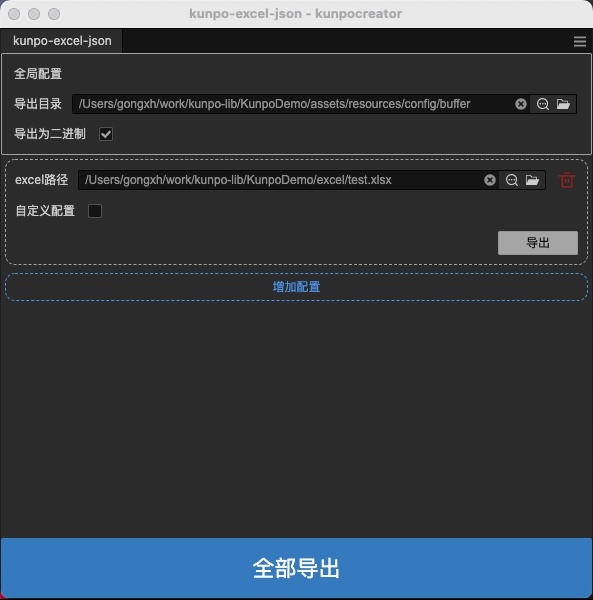
全局配置
- 导出目录: 设置默认的导出目录
- 二进制格式: 选择是否输出为二进制格式(.bin)而非JSON(.json)
单项配置
- 文件/文件夹路径: 选择要转换的Excel文件或包含Excel文件的文件夹
- 模式选择:
- 文件模式:转换单个Excel文件
- 文件夹模式:批量转换文件夹中的所有Excel文件
- 自定义配置: 启用后可为当前项目设置独立的导出目录和二进制格式
- 操作按钮:
- 导出:转换当前项目的Excel文件
- 删除:移除当前项目配置
批量操作
- 添加配置: 添加新的Excel转换配置
- 全部导出: 批量转换所有已配置的Excel文件或文件夹
使用建议
- 文件夹模式: 适用于需要批量处理多个Excel文件的场景
- 二进制格式: 用于游戏运行时的数据文件,体积更小,加载更快
- 路径管理: 建议使用相对路径,便于项目迁移
示例
表类型是数组
1. 基础类型
| list | |||||
|---|---|---|---|---|---|
| name | age | score | type | unlock | |
| string | int | float | bool | bool | |
| Alice | 20 | 98.5 | 1 | FALSE | |
| Bob | 22 | 87.5 | 0 | TRUE |
[
    {
        "name": "Alice",
        "age": 20,
        "score": 98.5,
        "type": true,
        "unlick": false
    },
    {
        "name": "Bob",
        "age": 22,
        "score": 87.5,
        "type": false,
        "unlick": true
    }
]
2. 数组类型
| list | ||||
|---|---|---|---|---|
| name | scores | |||
| string | list<2> | int | float | |
| Alice | 3 | 3.5 | ||
| Bob | null | 4 | 4.5 |
[
    {
        "name": "Alice",
        "scores": [
            3,
            3.5
        ]
    },
    {
        "name": "Bob",
        "scores": null
    }
]
3. 字典类型
| list | ||||
|---|---|---|---|---|
| name | position | |||
| string | dict<x,y> | int | int | |
| Alice | 10 | 20 | ||
| Bob | 30 | 40 |
[
    {
        "name": "Alice",
        "position": {
            "x": 10,
            "y": 20
        }
    },
    {
        "name": "Bob",
        "position": {
            "x": 30,
            "y": 40
        }
    }
]
4. 嵌套类型 (数组套字典)
| list | ||||||
|---|---|---|---|---|---|---|
| name | atts | |||||
| string | list<2|dict<en,ch» | string | string | string | string | |
| 张三 | one | 一 | two | 二 | ||
| 李四 | three | 三 | four | 四 |
[
    {
        "name": "Alice",
        "atts": [
            {
                "en": "one",
                "ch": "一"
            },
            {
                "en": "two",
                "ch": "二"
            }
        ]
    },
    {
        "name": "Bob",
        "atts": [
            {
                "en": "three",
                "ch": "三"
            },
            {
                "en": "four",
                "ch": "四"
            }
        ]
    }
]
5. 嵌套类型 (字典套数组)
| list | ||||||
|---|---|---|---|---|---|---|
| name | attr | |||||
| string | dict<en,cn|list<2» | string | string | string | string | |
| 张三 | one | two | null | 二 | ||
| 李四 | null | three | four | 三 | 四 |
[
    {
        "name": "Alice",
        "attr": {
            "en": [
                "one",
                "two"
            ],
            "cn": null
        }
    },
    {
        "name": "Bob",
        "attr": null
    }
]
6. 多层嵌套 (字典套数组套字典)
| list | ||||||||||
|---|---|---|---|---|---|---|---|---|---|---|
| name | attr | |||||||||
| string | dict<type,value|list<2|dict<x,y»> | int | int | int | int | int | int | int | int | |
| 张三 | 1 | 2 | 3 | 4 | 5 | 6 | 7 | 8 | ||
| 李四 | 11 | 12 | 13 | 14 | 15 | 16 | 17 | 18 |
[
    {
        "name": "张三",
        "attr": {
            "type": [
                {
                    "x": 1,
                    "y": 2
                },
                {
                    "x": 3,
                    "y": 4
                }
            ],
            "value": [
                {
                    "x": 5,
                    "y": 6
                },
                {
                    "x": 7,
                    "y": 8
                }
            ]
        }
    },
    {
        "name": "李四",
        "attr": {
            "type": [
                {
                    "x": 11,
                    "y": 12
                },
                {
                    "x": 13,
                    "y": 14
                }
            ],
            "value": [
                {
                    "x": 15,
                    "y": 16
                },
                {
                    "x": 17,
                    "y": 18
                }
            ]
        }
    }
]
表类型是字典
1. 混合
| dict | 字段名 | 类型 | 值 |
|---|---|---|---|
| id | int | 1 | |
| name | string | bob | |
| atts | list<2> | ||
| int | 50 | ||
| string | as | ||
| position | dict<x,y> | ||
| int | 12 | ||
| int | 22 |
{
    "id": 1,
    "name": "bob",
    "atts": [
        50,
        "as"
    ],
    "position": {
        "x": 12,
        "y": 22
    }
}
Excel 格式说明
数据表格式
第一行第一列:指定整个sheet的格式(list或dict)
总格式是list
- 第二行:字段名
- 第三行:类型描述
- 第四行开始:实际数据
总格式是dict
- 第二列:字段名
- 第三列:类型描述
- 第四列:实际数据
- 只有四列
支持的数据类型
简单类型
int:整数float:浮点数string:字符串bool:布尔值(不填、0、null、false 、FALSE为false,其他为true)
复合类型
list<n>:数组,n表示数组长度 表示向后(list) 或向下(dict)有n条配置内容dict<a,b,c>:字典,a,b,c表示字典的key 表示向后(list) 或向下(dict)有3条配置内容
嵌套类型
list<n|list<m>>:数组嵌套数组list<n|dict<a,b,c>>:数组嵌套字典dict<a,b|dict<x,y>>:字典嵌套字典dict<a,b|list<2>>:字典嵌套数组
转换说明
excel中的每个sheet作为一个json数据,按照sheet名,转换成对应的json文件
特殊规则
- 如果sheet名中包含”ignore”(不区分大小写),则该sheet将被自动跳过,不会进行转换
- 例如:”ignore_test”、”data_ignore”、”IGNORE”等都会被跳过